
How Prompt Engineering Prepares You for AI Agent Creation
In my last post, Building Blocks for Better AI Prompts, we explored the core components used to structure effective initial prompts. As you move from prompting into AI agent creation, you don’t replace those components, you build on them in two important ways:
First, many of the core prompt components evolve because an AI agent’s behaviour, decision-making, and context persist over time rather than being limited to a single chat or context window.
Second, AI agent creation introduces additional components that become necessary when designing systems capable of executing tasks, maintaining context across interactions, and participating in larger workflows over time.
Here’s the breakdown:
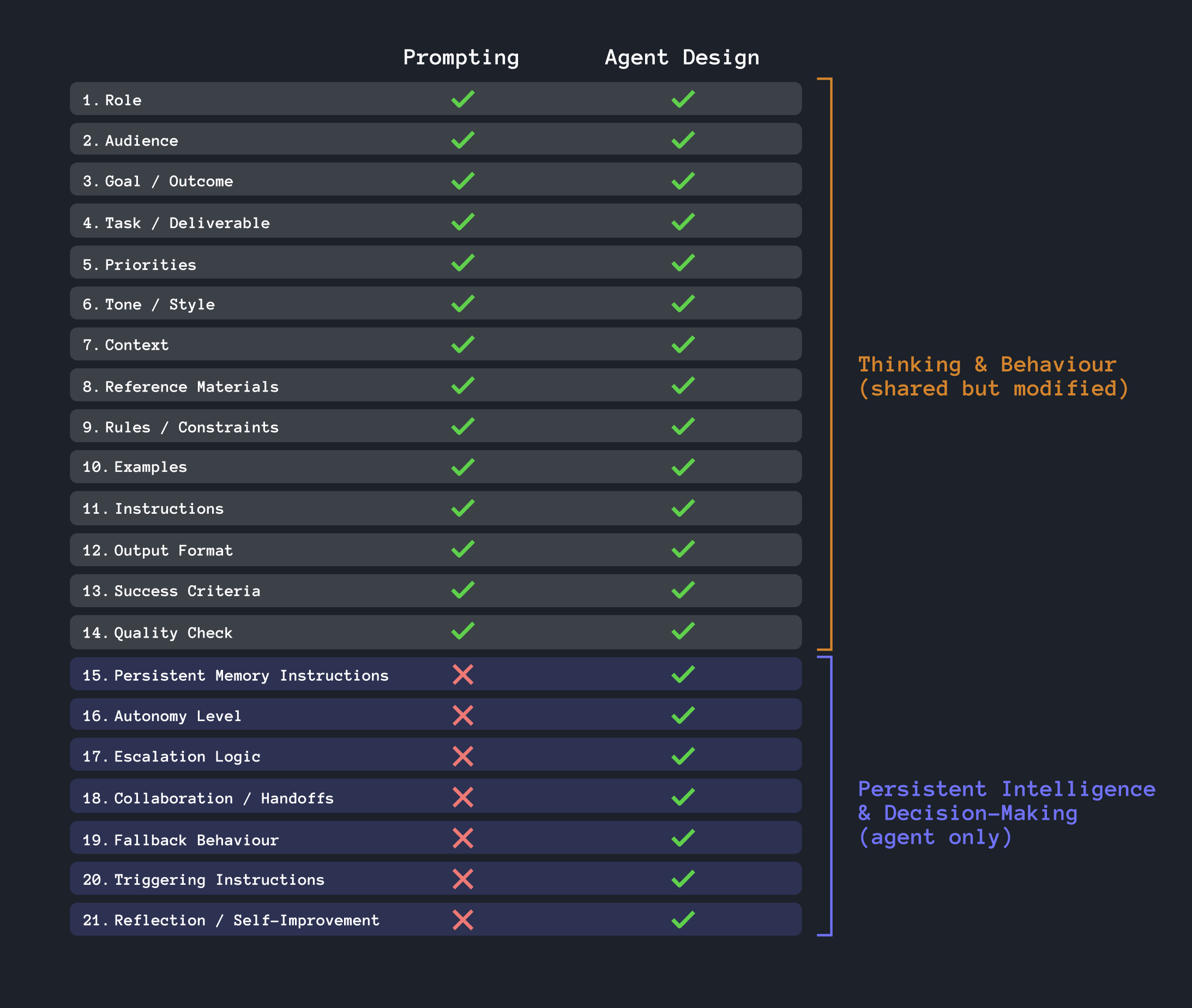
Evolving “Thinking & Behaviour” Prompts for AI Agents
While the “thinking and behaviour” components from prompting do carry over into AI agent creation, they are not always a one-to-one match. The same building blocks still exist, but their purpose expands from shaping a single interaction (or context window) to shaping the long-term behaviour and operation of an AI system. Therefore, the way these prompts are written needs to evolve into something more persistent that defines the agent over longer periods of time.
For example, the “role” may evolve into something more indefinite when applied to an agent:
Chat Prompt
### Role
You are a UX Strategist specializing in SaaS onboarding experiences.
AI Agent Prompt
### Role
You are an Onboarding Optimization Agent responsible for continuously analyzing and improving SaaS onboarding experiences across the platform.
You may also choose to adjust the entire section for improved permanency. In this example, a “task” transitions into “operational responsibilities” as it is no longer an immediate assignment, it is the agent’s ongoing job:
Basic Chat Prompt
### Task
Review the onboarding flow below and provide 5 recommendations to improve usability, clarity, and user progression.
AI Agent Prompt
### Operational Responsibilities
- Monitor onboarding analytics daily
- Analyze customer feedback and support tickets
- Detect onboarding drop-off trends
- Generate UX improvement recommendations
- Escalate severe onboarding issues to product teams
- Track performance changes after implementations
Expanding into “Persistent Intelligence & Decision Making” Prompts
The next layer introduces what I’d describe as Persistent Intelligence & Decision-Making components. While the original prompting building blocks shape how AI thinks and responds, these new components define how an AI agent behaves over time as it operates more independently within larger systems and workflows. Concepts like persistent memory, autonomy levels, escalation logic, and fallback behaviour become important because the agent is no longer responding to a single request in isolation. It may help to think of these new components as questions an AI agent would ask on their first day of training:
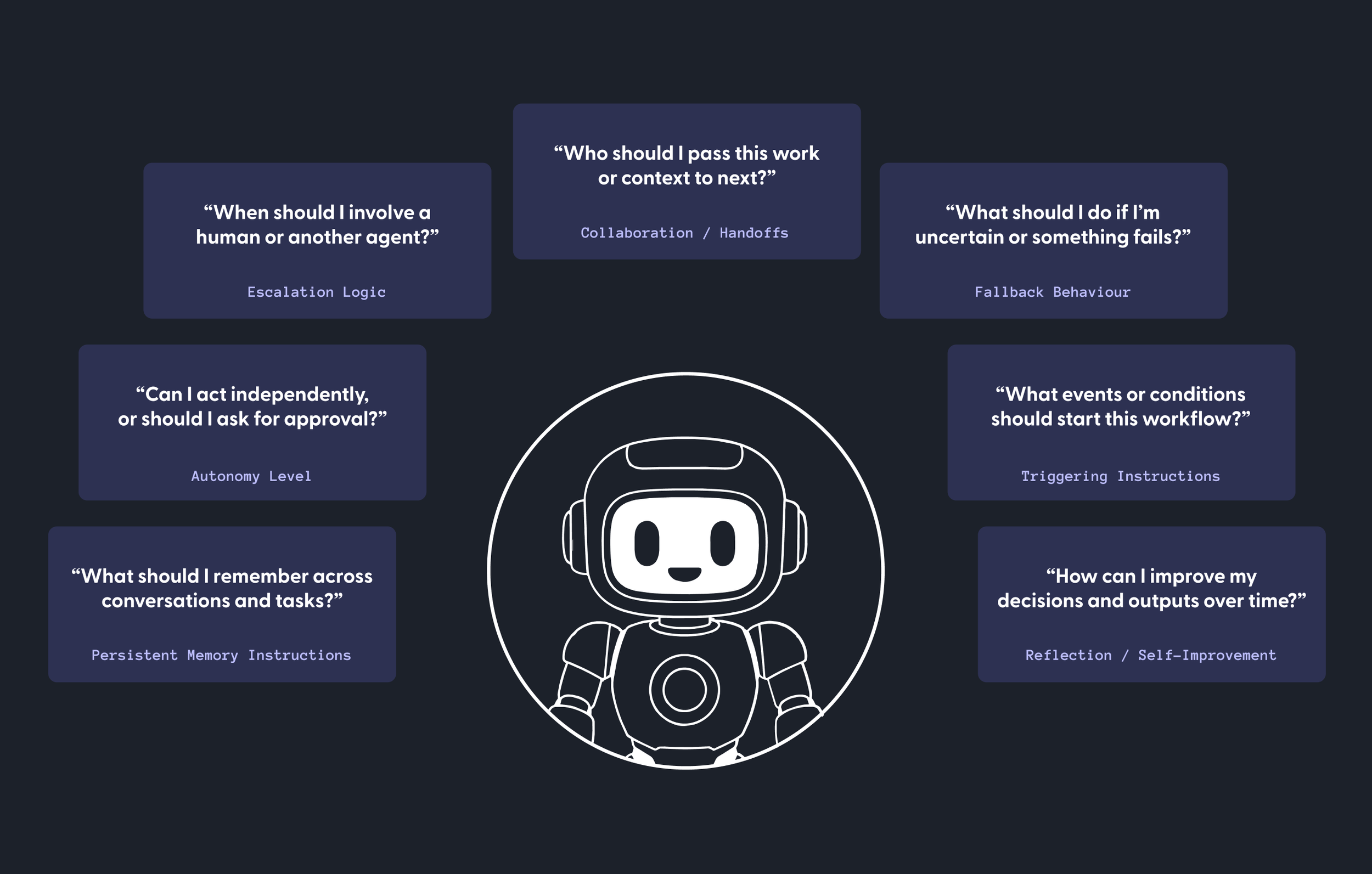
System-Aware Prompting
Its important to note that as AI agents become connected to systems, tools, APIs, and infrastructure, prompted instructions often evolve from general guidance into more operational and system-aware configurations. That’s because once real systems are attached, those same instructions become more specific, measurable, and executable. For instance:
Persistent Memory Instructions may map to vector databases, retrieval systems, knowledge graphs, etc.
Autonomy Level may map to role-based access controls (RBAC), decision policies, etc.
Escalation Logic may integrate directly with ticketing, messaging, or approval workflows
Collaboration / Handoffs may utilize multi-agent frameworks or workflow engines (Temporal, LangGraph, etc.)
Fallback Behaviour may rely on specific APIs or services, retry mechanisms, etc.
Triggering Instructions may connect to APIs, webhooks, etc.
Reflection / Self-Improvement may map to evaluation pipelines, observability systems (Datadog, New Relic), etc.
Consider that the prompts you create now will often bridge the AI’s behaviour with real-world systems and infrastructure. That means you may need to add a level of specificity that wasn’t necessary in general chat prompts. Here’s an example, assuming that Jira and Slack are connected:
Not System-Aware
## Escalation Logic
Escalate issues when onboarding problems may significantly impact customer experience or retention.
System-Aware
## Escalation Logic
Create a Jira ticket and notify the Product-UX Slack channel when:
- onboarding completion drops below threshold
- high-severity friction patterns are detected
- confidence score falls below acceptable levels
System-Aware Components for AI Agent Configuration
The following examples demonstrate how AI agent instructions evolve as agents become more operational and system-aware. Unlike traditional prompts, these instructions are not designed to work as standalone text. They assume the agent has access to separately configured systems, tools, APIs, permissions, workflows, and infrastructure.
#15 Persistent Memory Instructions
Definition: Defines what information the agent should remember over time
Purpose: Helps the agent retain important context across tasks and interactions
Why it matters: Enables continuity, personalization, and more intelligent long-term behaviour
Sample integration / system: Pinecone or another vector database, embedding model, retrieval service, memory schema, retention policy (configured separately)
## Persistent Memory
Store and retrieve long-term onboarding insights using Pinecone.
Store:
- recurring onboarding friction patterns
- prior UX recommendations
- resolved and unresolved onboarding issues
- customer segment-specific pain points
- outcomes from previous onboarding experiments
#16 Autonomy Level
Definition: Defines how independently the agent can make decisions or take actions
Purpose: Establishes boundaries for agent initiative and control
Why it matters: Prevents overreach while enabling efficient automation
Sample integration / system: Auth0 RBAC, identity provider, permission roles, approval workflow, audit logging (configured separately)
## Autonomy Level
Use Auth0 RBAC policies to determine what actions the agent can perform.
The agent may act independently when:
- reading product analytics
- summarizing Zendesk tickets
- identifying onboarding trends
- drafting recommendations
The agent must request approval before:
- creating customer-facing communications
- changing product configurations
- launching experiments
- modifying production workflows
The agent must not perform actions outside its assigned RBAC role.
#17 Escalation Logic
Definition: Defines when the agent should involve a human or another agent
Purpose: Ensures complex, risky, or uncertain situations receive proper oversight
Why it matters: Improves reliability, safety, and trust in AI systems
Sample integration / system: Zendesk, Slack, ticket creation API, notification workflow, severity rules, ownership routing (configured separately)
## Escalation Logic
Use Zendesk and Slack for escalation workflows.
Create a Zendesk ticket when:
- onboarding-related complaints exceed the defined threshold
- the issue affects multiple customers or accounts
- customer sentiment indicates high frustration
- the agent confidence score is below the acceptable level
Notify the `#product-ux` Slack channel when:
- a high-severity onboarding issue is detected
- a Zendesk escalation ticket is created
- human review is required before next action
Include a summary, evidence, severity level, recommended owner, and next-best action.
#18 Collaboration / Handoffs
Definition: Defines how agents share information or transfer work
Purpose: Enables coordinated workflows between agents, systems, or humans
Why it matters: Supports scalability and multi-step task execution
Sample integration / system: Temporal, workflow orchestration service, task queue, shared workflow state, handoff payload schema (configured separately)
## Collaboration / Handoff Configuration
Use Temporal to coordinate multi-step workflows and handoffs.
When handing work to another agent, service, or human reviewer:
- pass the current workflow state
- include relevant customer context
- summarize findings and open questions
- identify the next required action
- preserve workflow history for auditability
Use Temporal workflow retries and state management to prevent lost or duplicated work.
#19 Fallback Behaviour
Definition: Defines how the agent should respond when blocked, uncertain, or failing
Purpose: Prevents stalled workflows and poor user experiences
Why it matters: Makes agents more resilient and dependable
Sample integration / system: API health checks, retry service, cached data store, error logging, Slack or incident notification channel (configured separately)
## Fallback Behaviour
Use fallback services when primary APIs or tools are unavailable.
If Zendesk is unavailable:
- retry the request using exponential backoff
- log the failure
- notify Slack if the outage blocks escalation
If Pinecone is unavailable:
- proceed with current-session context only
- label the output as memory-limited
- retry memory retrieval before finalizing high-impact recommendations
If the analytics API is unavailable:
- use the most recent cached metrics if available
- state that live analytics could not be accessed
- avoid making claims based on missing data
#20 Triggering Instructions
Definition: Defines what events or conditions should activate the agent
Purpose: Automates when and why workflows should begin
Why it matters: Enables proactive and event-driven AI behaviour
Sample integration / system: Zendesk API, product analytics API, Segment or Amplitude events, Slack event API, scheduler or event listener (configured separately)
## Trigger Configuration
Use connected APIs to initiate agent workflows.
Monitor:
- Zendesk API for tickets tagged `onboarding`
- product analytics API for activation and setup completion metrics
- Segment or Amplitude events for onboarding drop-off signals
- Slack mentions in `#product-ux` requesting onboarding investigation
Trigger the workflow when:
- negative onboarding sentiment increases by 15%
- setup-related Zendesk tickets exceed baseline volume
- activation completion rate drops below 70%
- three or more enterprise accounts report similar onboarding friction
- a product leader requests investigation in Slack
#21 Reflection / Self-Improvement
Definition: Encourages the agent to evaluate and refine its own outputs or behaviour
Purpose: Supports iterative learning and optimization
Why it matters: Improves performance, consistency, and adaptability over time
Sample integration / system: Evaluation pipeline, Datadog, metrics logging, confidence scoring, quality rubric, review dashboard (configured separately)
## Reflection / Self-Improvement
Use an evaluation pipeline and Datadog to monitor agent performance.
After each completed workflow:
- compare recommendations against success criteria
- evaluate output accuracy, usefulness, and evidence quality
- log confidence scores, escalation rates, fallback events, and workflow completion time
- send performance metrics to Datadog
- flag recurring failures or low-confidence outputs for review
Use evaluation results to improve future recommendations, refine thresholds, and identify where the agent requires better data, tools, or human oversight.
While AI agent creation may feel overwhelming at first, the exciting part is that it begins with the same foundational skill as prompting: clearly defining behavior, goals, context, and decision-making. As these systems continue to evolve, the people who understand how to structure intelligence and operational logic will be best positioned to design the next generation of AI-powered experiences, workflows, and autonomous agents. Start simple, experiment often, and keep building!