
Building Blocks for Better AI Prompts
Whether you’re just starting to explore Claude or other AI chat tools, or you’ve been using them for a while and simply want to improve your prompting habits, the foundational lessons in Prompting 101 are a helpful reminder of what actually leads to better results.

Getting an AI model to produce exactly what you want on the first try can feel surprisingly difficult, especially during a busy workday when prompts often become rushed, instructions get a little vague, or we assume the AI understands more context than it actually does. The good news is that better prompting usually doesn’t require complicated techniques. Small improvements in clarity, structure, and context can make a huge difference in the quality of the response.
Great prompting isn’t about finding secret keywords or “magic” phrases. It’s about communicating clearly. The best initial prompts provide context, define goals, clarify priorities, and explain what a successful response should look like.
Writing Effective Initial Prompts
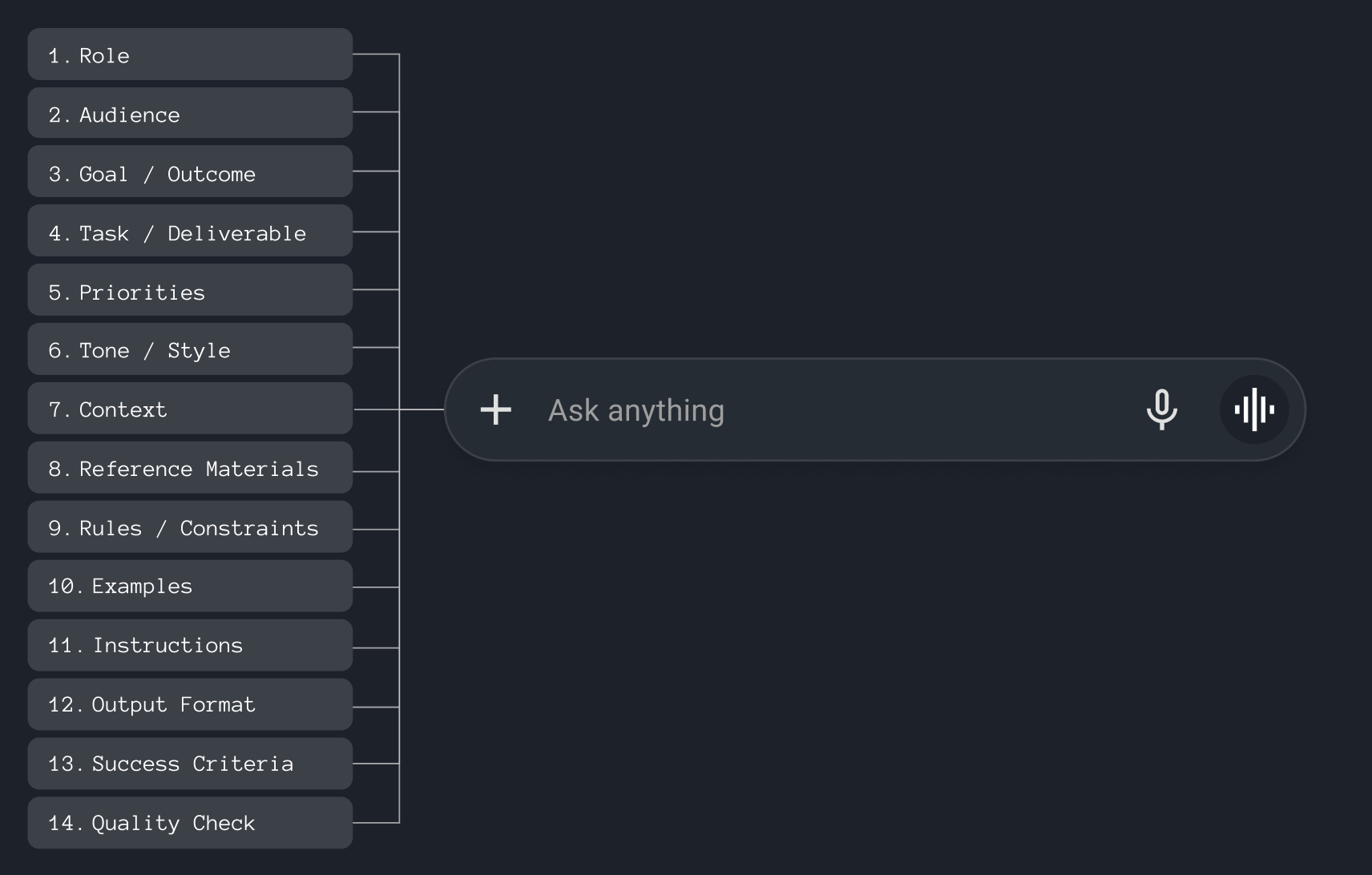
If the ideas in the video feel difficult to apply directly to your own prompting workflow, it can help to think about initial prompts as a set of flexible building blocks. The fourteen building blocks listed below represent the core elements that can be used to craft a strong initial prompt for AI. Together, they help establish clear context, expectations, constraints, and success criteria so the AI can generate more accurate, relevant, and consistent outputs.
While these sections are especially useful for structuring initial user prompts, many of them also map naturally to system prompts, where they define more persistent behaviours such as role, tone, rules, and priorities. Not every prompt requires every block. Simple requests may only need a role and a clear outcome, while more strategic or complex tasks benefit from additional context and guidance.
#1 Role
Definition: Defines who the AI should act as
Purpose: Sets expertise and perspective
Why it matters: Improves relevance, accuracy, and decision-making
#Role
You are a senior UX Strategist specializing in SaaS platforms, AI-assisted experiences, product-led growth strategies, and onboarding workflows.
#2 Audience
Definition: Defines who the output is for
Purpose: Tailors communication appropriately
Why it matters: Changes tone, complexity, and framing
#Audience
The audience is product leaders, designers, engineers, and executive stakeholders evaluating strategic UX recommendations.
#3 Goal / Desired Outcome
Definition: States the ultimate objective
Purpose: Aligns the AI to the desired result
Why it matters: Keeps outputs outcome-focused, not task-focused
#Goal / Desired Outcome
Create a UX strategy that improves usability, reduces friction, shortens time-to-value, and increases the activation rate of the current onboarding experience. Align the strategy with key business goals
#4 Task / Deliverable
Definition: Specifies what the AI should produce
Purpose: Clarifies the immediate assignment
Why it matters: Reduces ambiguity and improves execution
#Task / Deliverable
Analyze the current onboarding experience designed for small businesses.
Your task is to:
- identify friction points in the onboarding flow
- recommend UX improvements
- improve activation and first-value experience
- suggest messaging and guidance improvements
- propose ways to increase completion rates and product adoption
The goal is to create a smoother, faster, and more intuitive onboarding experience for non-technical SMB users.
#5 Priorities
Definition: Identifies what matters most
Purpose: Guides tradeoffs and focus
Why it matters: Helps the AI make better decisions under constraints
#Priorities
Prioritize the following when making recommendations:
1. Simplicity and clarity for non-technical users
2. Faster time-to-value and activation
3. Reducing onboarding abandonment
4. Practical improvements that can realistically be implemented
5. Balancing user experience with business goals
If tradeoffs exist, prioritize usability and clarity over feature complexity.
#6 Tone / Style
Definition: Defines how the output should sound
Purpose: Shapes communication style
Why it matters: Ensures consistency with brand, audience, or intent
#Tone / Style
Use a professional, strategic, concise, and collaborative tone. Balance executive-level thinking with practical UX recommendations.
#7 Context
Definition: Provides background and situational details
Purpose: Improves understanding
Why it matters: Leads to more accurate and personalized outputs
#Context
The product is an AI-powered SaaS platform serving SMBs.
The target audience includes:
- local businesses
- service providers
- entrepreneurs
Current onboarding issues include:
- high drop-off during setup
- users feeling overwhelmed
- low completion rates
- unclear next steps after accessing the platform
The company wants to:
- improve onboarding completion
- increase activation rates
- reduce support tickets
- improve customer confidence in AI-generated results
The onboarding flow currently includes:
1. Business search and selection
2. Industry confirmation
4. AI training and demo
5. Access account
6. Receive welcome message
#8 Reference Materials
Definition: Supplies source information or examples
Purpose: Grounds responses in trusted inputs
Why it matters: Reduces hallucinations and improves factual quality
#Reference Materials
Use the following materials as source information when generating recommendations.
Attached files:
- OnboardingFlowScreens.pdf (screenshots of the current onboarding experience)
- UserResearchNotes.docx (usability findings and customer feedback)
- AnalyticsDashboard.xlsx (onboarding conversion and drop-off metrics)
- BusinessMetrics.xlsx (list of executive-level, key performance indicators and goals)
- BrandGuidelines.pdf (tone, style, and visual standards
Data sources:
- https://www.nngroup.com/
- https://baymard.com/
- https://www.userinterviews.com/blog/
When reviewing the materials:
- prioritize the attached files as the primary source of truth
- use external resources only to support recommendations
- identify usability patterns and friction points
- call out assumptions where information is incomplete
#9 Rules / Constraints
Definition: Defines boundaries and requirements
Purpose: Prevents unwanted behaviour or outputs
Why it matters: Ensures compliance, consistency, and safety
#Rules / Constraints
Please follow these rules carefully:
- Do not recommend solutions that require a complete rebuild
- Recommendations must be feasible within a phased rollout
- Maintain consistency with existing design systems where possible
- Avoid unnecessary feature complexity
#10 Examples
Definition: Shows what good looks like (and also what bad looks like)
Purpose: Demonstrates desired patterns
Why it matters: Accelerates learning and improves output quality
#Examples
Strong recommendation example:
“Reduce the number of onboarding steps shown upfront by progressively revealing information only when needed. This lowers cognitive load and helps users feel momentum early in the experience.”
Weak recommendation example:
“Improve the onboarding experience to make it more user friendly.”
Strong UX messaging example:
“We’re creating your account now. This usually takes less than 30 seconds.”
Weak UX messaging example:
“AI processing initiated.”
#11 Instructions
Definition: Explains how to approach the work
Purpose: Guides execution step-by-step
Why it matters: Produces more reliable and repeatable results
#Instructions
Please follow this process when generating your response:
1. Analyze the onboarding flow and identify the largest friction points
2. Identify where users may feel confused, overwhelmed, or uncertain
3. Recommend UX improvements that improve clarity and momentum
4. Suggest onboarding messaging improvements
5. Recommend ways to improve trust in AI-generated results
6. Identify opportunities to reduce abandonment
7. Prioritize recommendations by impact and implementation effort
8. Include measurable success metrics where possible
#12 Output Format
Definition: Defines how the response should be structured
Purpose: Standardizes presentation
Why it matters: Makes outputs easier to use, parse, or automate
#Output Format
Structure the response using the following sections:
## Executive Summary
## Key Onboarding Problems
## User Experience Analysis
## Friction Points & Root Causes
## Recommended UX Improvements
### Quick Wins
### Medium-Term Improvements
### Long-Term Opportunities
## Messaging & Guidance Recommendations
## AI Trust & Transparency Improvements
## Mobile & Accessibility Considerations
## Prioritized Recommendations Matrix
## Success Metrics & KPIs
## Final Recommendations
#13 Success Criteria
Definition: Defines how success is measured
Purpose: Aligns the AI to quality expectations
Why it matters: Improves goal alignment and usefulness
#Success Criteria
The strategy should:
- Be actionable and realistic
- Improve usability and customer understanding
- Align UX improvements with business goals
- Help teams prioritize effectively
- Be understandable by both designers and executives
#14 Quality Check
Definition: Reviews and validates the output
Purpose: Encourages self-evaluation and refinement
Why it matters: Catches errors, gaps, and inconsistencies before delivery
#Quality Check
Before finalizing the response:
- Ensure recommendations are specific, actionable, and realistic for implementation
- Confirm priorities align with stated business goals (key performance indicators)
- Remove vague or redundant suggestions
- Verify clarity and strategic consistency
- Ensure outputs are concise, logically structured, and easy to present to stakeholders
Make sure recommendations clearly connect to user problems and business goals.
If important information is missing, clearly state any assumptions made.
Remember that better prompting isn’t about learning complicated tricks. It’s about communicating more clearly with AI tools. By adding the right amount of structure, context, and direction for the task at hand, you’ll consistently get more useful, accurate, and reliable results from the start. Happy prompting!